
Introduction
In modern RFID deployments, achieving real-time visibility depends on the seamless interaction between multiple layers of technology. From handheld readers capturing tag data to cloud platforms processing information and enterprise systems consuming it, each component must function correctly for the system to deliver value.
However, in complex environments, issues can arise where RFID tags are successfully read by a handheld device, yet the data does not appear in the Warehouse Management System (WMS) or ERP platform. When this occurs, it is critical to approach troubleshooting in a structured and methodical way.
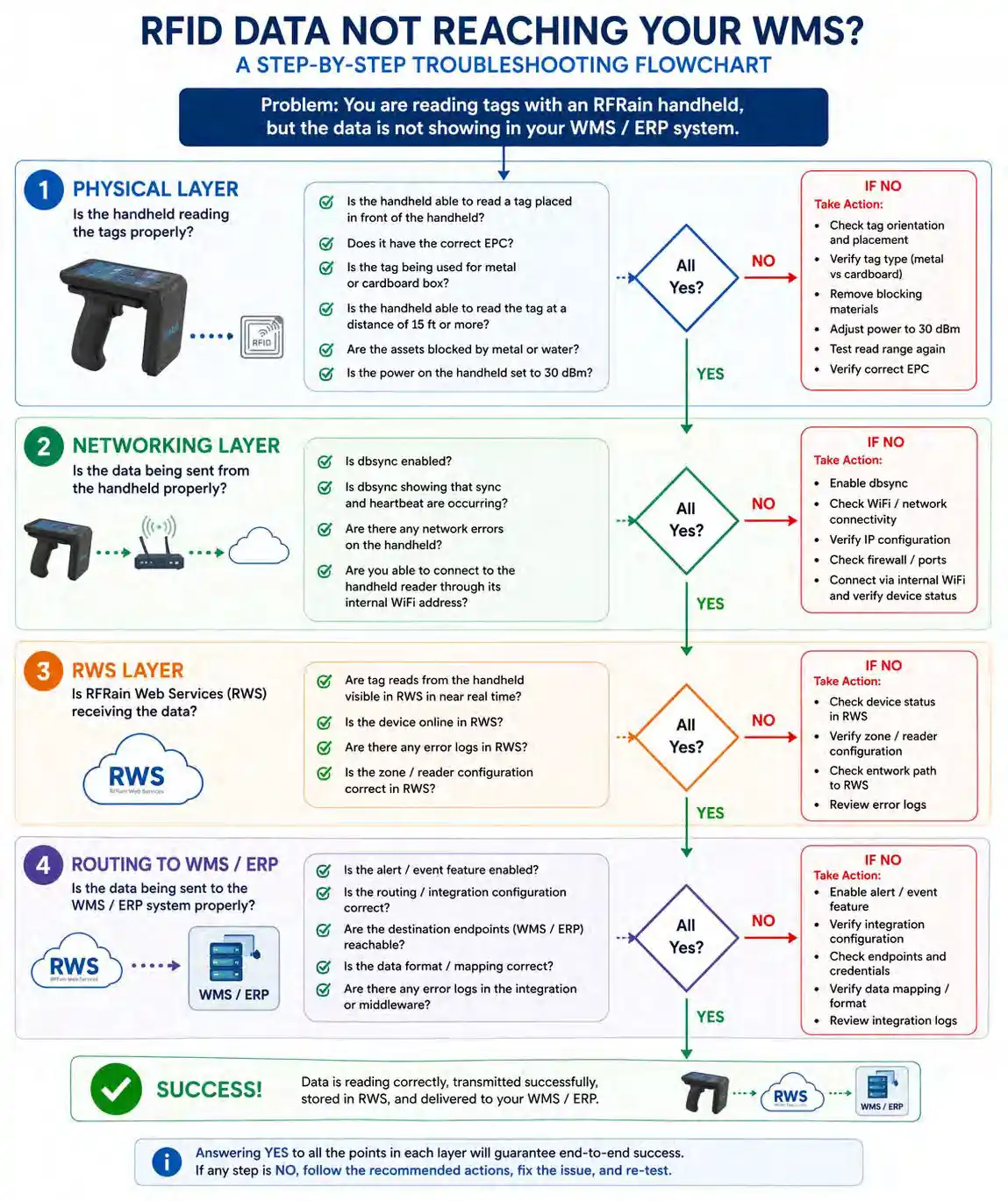
The most effective strategy is to break the system down into distinct layers and validate each one independently. These layers include the physical layer, the networking layer, the cloud platform (RFRain Web Services), and the final routing to enterprise systems.
Step 1: Validate the Physical Layer
The first step is to confirm that the handheld reader is correctly capturing RFID data. If the reader is not properly reading tags, the issue will propagate through the entire system. Start by verifying that the handheld is able to read a tag placed directly in front of it. This confirms that the device is operational and capable of detecting RFID signals. Once a read is confirmed, the next step is to ensure that the tag being read contains the correct EPC (Electronic Product Code). Incorrect or unexpected EPC values can create confusion downstream, even if the read itself is successful.
It is also important to confirm that the correct type of RFID tag is being used for the application. Tags designed for cardboard or standard packaging behave differently from tags designed for metal surfaces. Using the wrong tag type can significantly reduce read performance or prevent reads altogether. Distance is another critical factor. The handheld should be able to read tags at a range of approximately 15 feet or more under normal conditions. If read range is significantly lower, it may indicate an issue with tag quality, antenna orientation, or power settings.
Environmental factors must also be considered. Materials such as metal and liquids can interfere with RF signals, either by reflecting or absorbing energy. If assets are surrounded by these materials, they may block or degrade signal propagation, resulting in inconsistent reads. Finally, confirm that the handheld transmit power is set correctly. A recommended setting of 30 dBm ensures sufficient RF energy to penetrate pallet layers and reach tags reliably. Lower power settings may result in incomplete or inconsistent reads. If all of these conditions are satisfied, the physical layer can be considered validated.
Step 2: Verify the Networking Layer
Once tag reads are confirmed, the next step is to ensure that the data is being transmitted correctly from the handheld to the network. A key component in this process is the dbsync service, which is responsible for synchronizing data between the device and the backend system. It is essential to verify that dbsync is enabled and functioning properly.
You should confirm that both synchronization and heartbeat signals are actively being transmitted. The heartbeat ensures that the device is connected and communicating, while synchronization ensures that collected data is being pushed upstream.
Another important step is to verify connectivity to the handheld device itself. This can be done by connecting to the handheld through its internal Wi-Fi address. If the device is not
reachable, it may indicate a network configuration issue, such as incorrect IP settings or connectivity problems within the local network.
Validating the networking layer ensures that data is leaving the device and entering the broader system infrastructure.
Step 3: Confirm Data Reception in RFRain Web Services (RWS)
After verifying that data is being transmitted from the handheld, the next step is to confirm that it is being received and processed by RFRain Web Services (RWS).
RWS acts as the central platform for collecting, storing, and managing RFID data. It is critical to verify that tag reads from the handheld are appearing in RWS in near real time.
If data is not visible in RWS, the issue may lie in network routing, device configuration, or synchronization settings. However, if the data is successfully received in RWS, it confirms that both the physical and networking layers are functioning correctly.
At this stage, the system has successfully captured and centralized the data, and attention can shift to downstream integration.
Step 4: Validate Routing to the WMS or ERP System
The final step is to ensure that data is being correctly transmitted from RWS to the WMS or ERP system. This process typically relies on configuration settings and event-driven mechanisms. One of the first checks should be whether the alert or event feature is enabled. These features are often responsible for triggering data transmission to external systems. Next, verify that the configuration parameters for integration are correct. This includes endpoints, credentials, data formats, and mapping logic. Even a minor misconfiguration can prevent data from reaching the WMS, despite being correctly captured and stored upstream. It is also important to ensure that the receiving system (such as SAP or Microsoft Dynamics 365) is properly configured to accept incoming data. Integration requires alignment on both sides, and issues can arise if expectations are not synchronized.
A Structured Approach Guarantees Success
Troubleshooting RFID systems can seem complex but breaking the problem into layers simplifies the process significantly. By validating each stage independently—physical, networking, cloud processing, and enterprise integration—you can quickly isolate and resolve issues.
When all layers are functioning correctly, the system operates seamlessly. Tags are read accurately, data is transmitted reliably, and actionable information is delivered to enterprise systems in real time.
Answering“yes”to each of the validation steps outlined above ensures that the system is fully operational and performing as expected.
Conclusion
RFID systems are powerful tools for enabling real-time visibility, but they depend on the proper alignment of multiple components. When issues arise, a structured troubleshooting approach is essential.
By methodically validating each layer of the system, organizations can identify root causes quickly and restore full functionality with minimal disruption.
Closing Statement
RFRain’s integrated RFID platform is designed to simplify both deployment and troubleshooting by providing full visibility across every layer of the system. From edge devices to cloud infrastructure and enterprise integration, RFRain ensures that data flows reliably enabling organizations to operate with confidence and precision.